Spoken Words Counter
Count your spoken words live – as an OBS overlay.
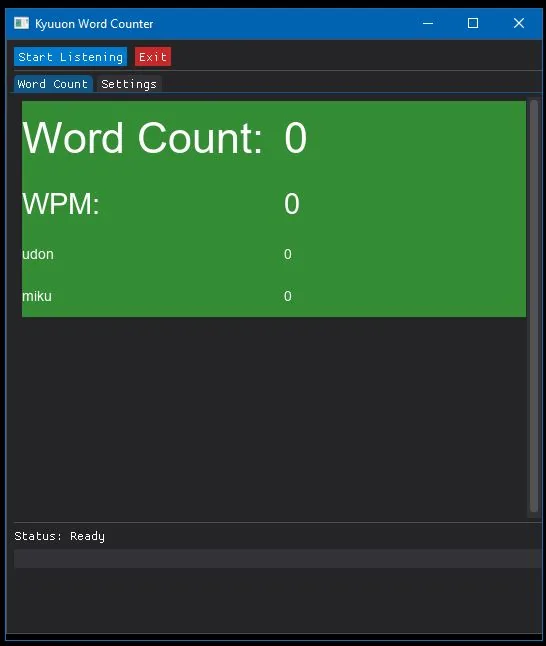
Just how many words can someone say in one stream?
The idea came from watching the endlessly talkative VTuber Kyuuon. The answer is: a lot – and now you don't have to guess. The Spoken Words Counter tracks in real time how many words your favourite VTuber, podcaster or streamer – or you yourself – says during a live broadcast.
Features
- Any audio device Counts words in real time, e.g. from VB-Audio Cable
- Your own words Count mentions of custom words (v1.0.4, still a bit unreliable)
- OBS-friendly Background colour for green-screening; colours and fonts adjustable
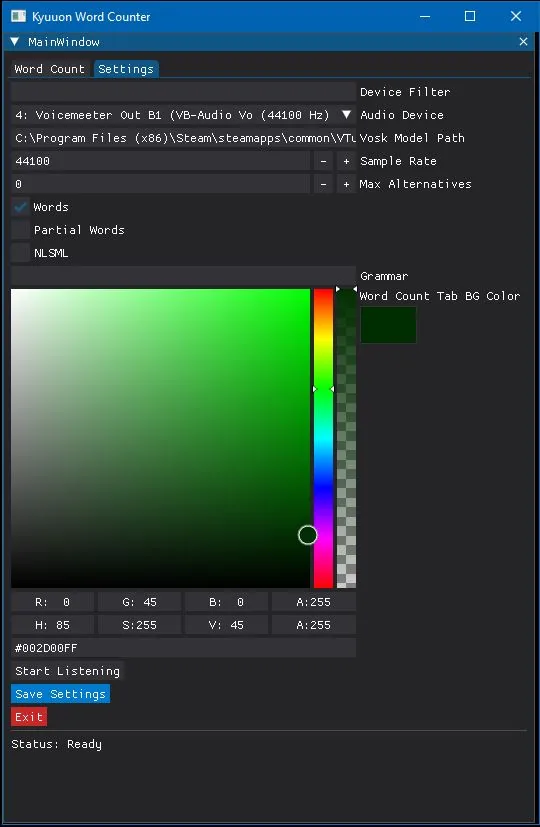
- Offline speech recognition Uses a local Vosk model; settings are saved to config.ini
Setup
- Download an English Vosk model from alphacephei.com/vosk/models and extract it.
- Start the app, open the settings tab and set the model path (e.g.
./model). - Select your audio device (e.g. VB-Audio Cable) and adjust the UI settings.
- The word count updates in real time; your settings are saved to
config.ini.
Troubleshooting: if the audio device doesn't work, check your system sound settings and the device indices in the settings tab.
Screenshots
Download
Download v1.0.4 (Windows, ~72 MB)
Also available: v1.0.3 · example config.ini · README
Support, tips and word count records: Discord