




What Digester Does
You save hundreds of posts and never read them again. Digester collects them, normalizes them into a local database, and turns that pile into something you can actually work with: full-text and semantic search, persistent categories, long-form briefings per topic and time window, and a read-only MCP server so your IDE assistant can read the archive too.
It is deliberately local-first. The service binds to 127.0.0.1 only, the database is a single SQLite file, media is downloaded to disk, and every AI feature runs against your own LM Studio instance. There are no developer API keys, no cloud accounts and no telemetry.
- Collects X Likes and Bookmarks, Reddit Saved and Upvoted, LinkedIn Saved posts — through a dedicated logged-in browser profile, not a platform API.
- Normalizes text, original URLs, metadata and downloaded media into SQLite, with full-resolution Reddit gallery images instead of preview thumbnails.
- Understands your library through LM Studio: categorization, category discovery, embeddings, grounded question answering and long-form digests.
- Compares your saved posts against your own local code projects, surfacing the security fixes, new techniques and tools that actually affect what you are building — each backed by evidence from your own files.
- Exposes everything read-only over MCP to Codex, Cursor, Claude Desktop and DeepSeek Harness.
The part that changes how you read. A saved post is only worth anything if it changes what you build. Point Digester at one of your local projects and it first profiles what that codebase actually does, then checks your recent posts against it and keeps only what is genuinely relevant to it: a security fix in a library you depend on, a technique that would replace something you hand-rolled, a model or tool that fits your stack, a limitation somebody else already ran into.
Every finding has to be supported by both a saved post and evidence in your own files, and the report cites the project-relative paths it is talking about. So instead of another undifferentiated feed, you get “this one matters for this project, and here is the file it touches” — along with the pros, the cons and unknowns, and a prioritized list of what to do about it.
View the Repository →The repository is private and invite-only. Ask for access if you want to look inside.
App Screenshots
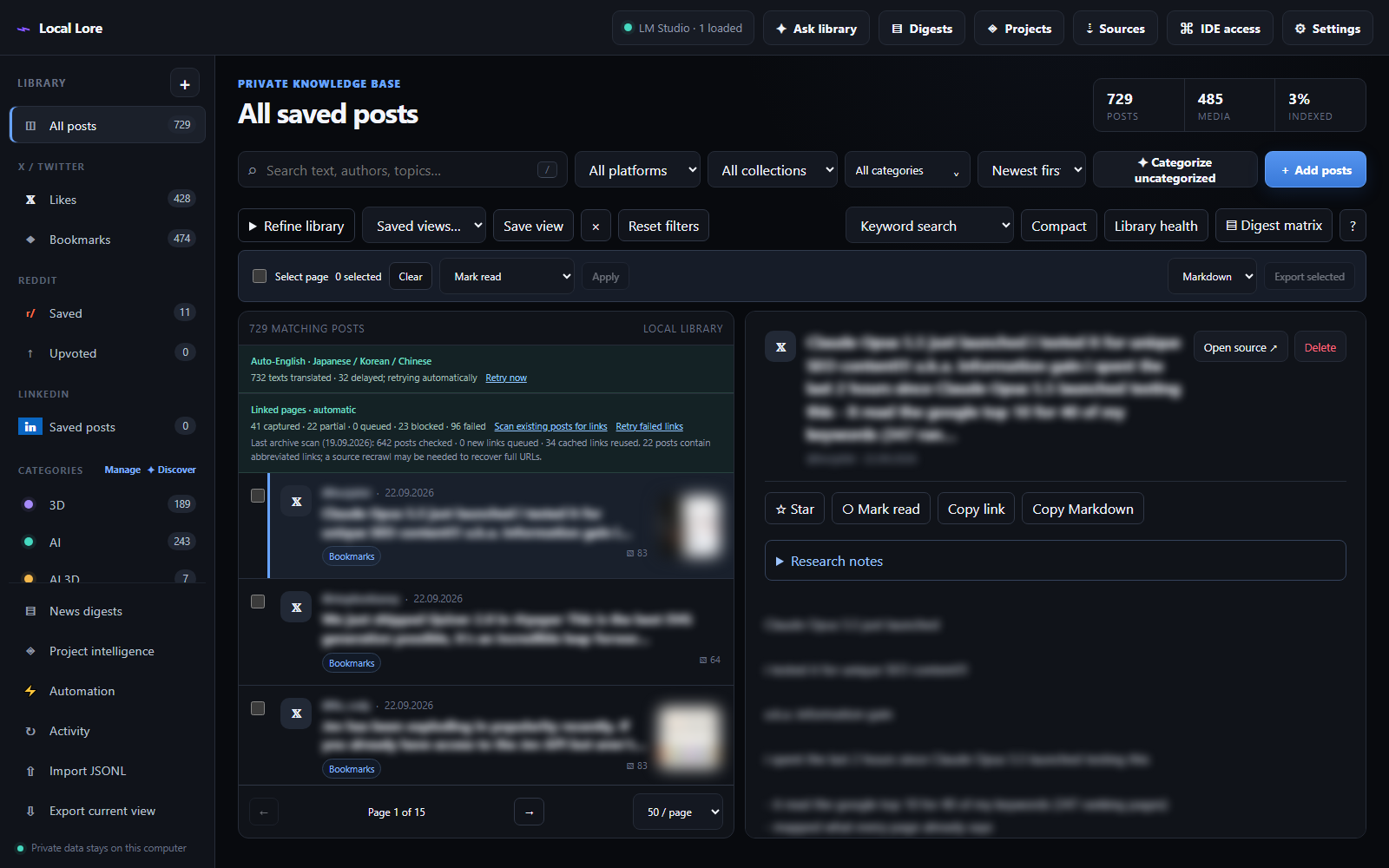
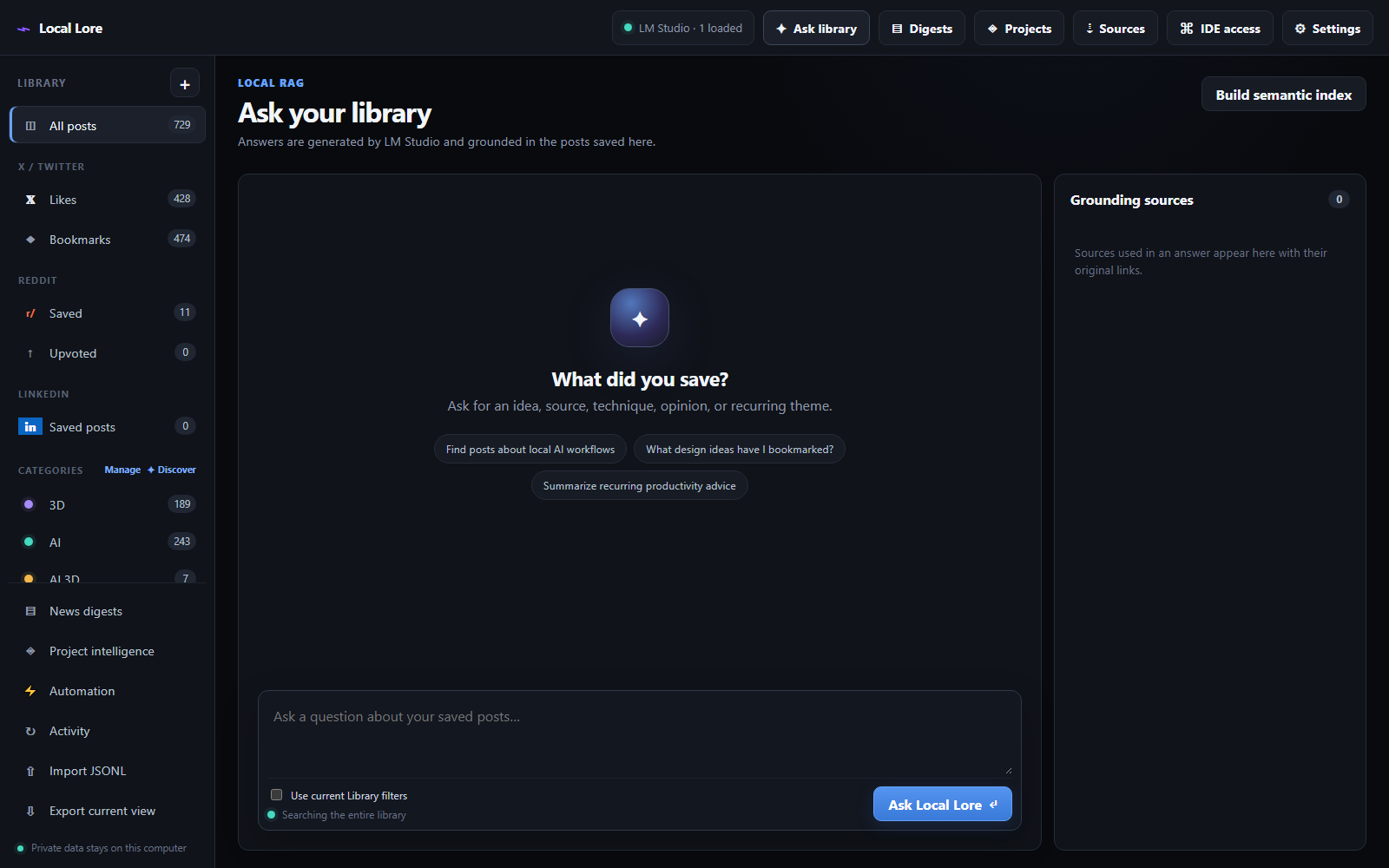
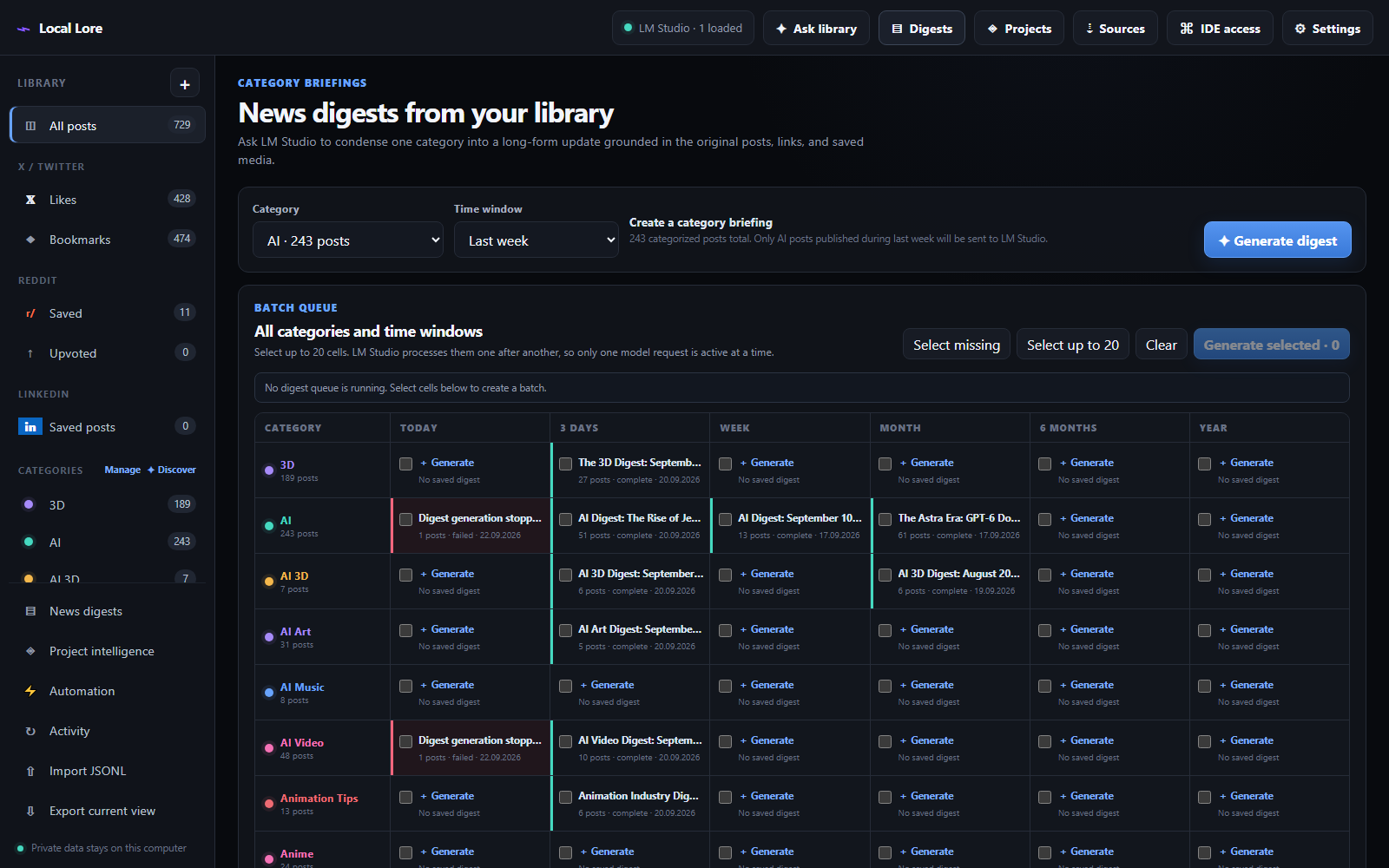
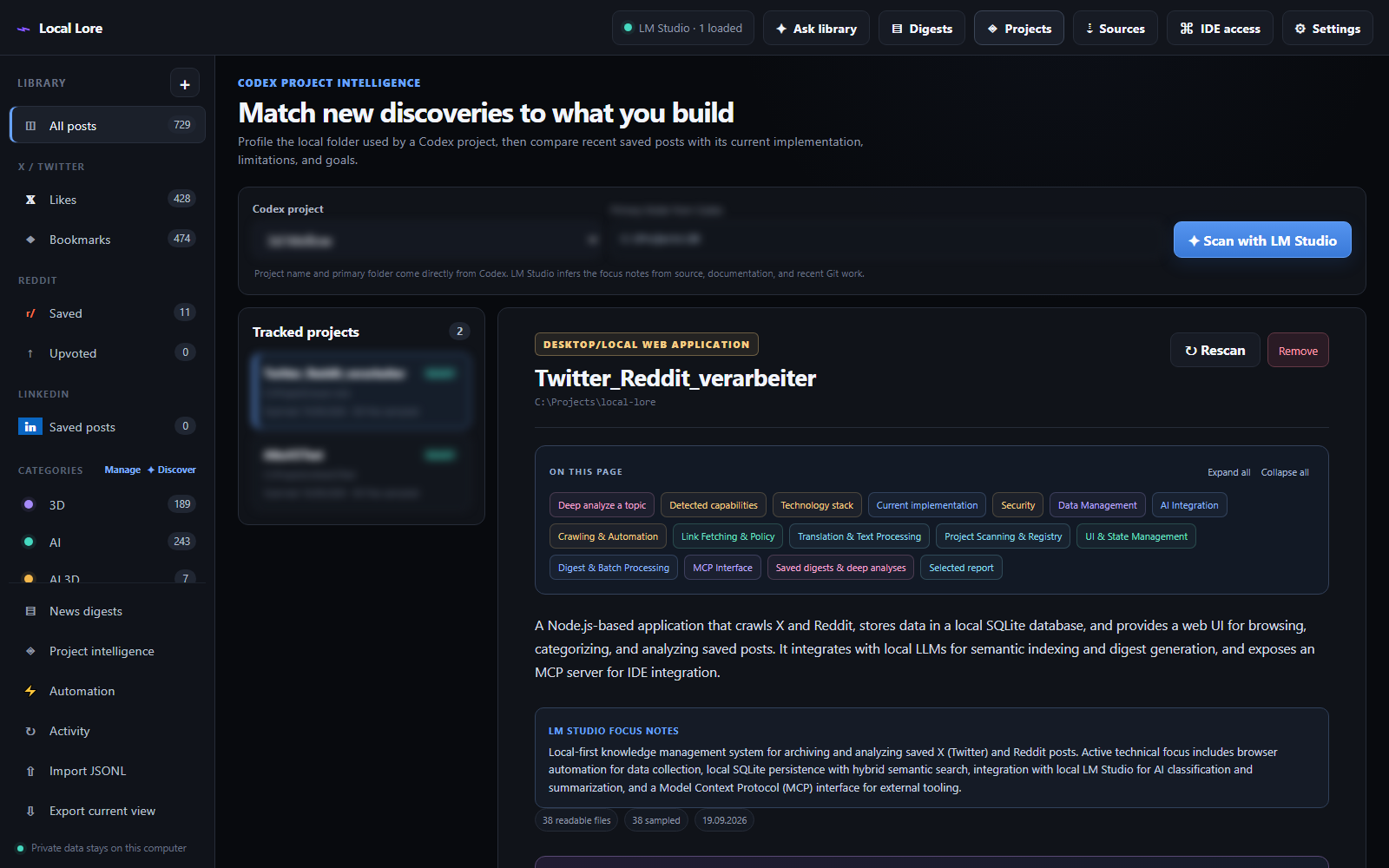
Digester runs as a local dashboard in your browser at http://127.0.0.1:4317. A dark, dependency-free interface with a collection sidebar on the left and one view per workflow. Click any screenshot to see it full size.
These are captures of a real library of 729 saved posts, not mock-ups. Post text, author names and media thumbnails are deliberately blurred — the archive belongs to one person and the posts in it belong to their authors.

Sources & Collection
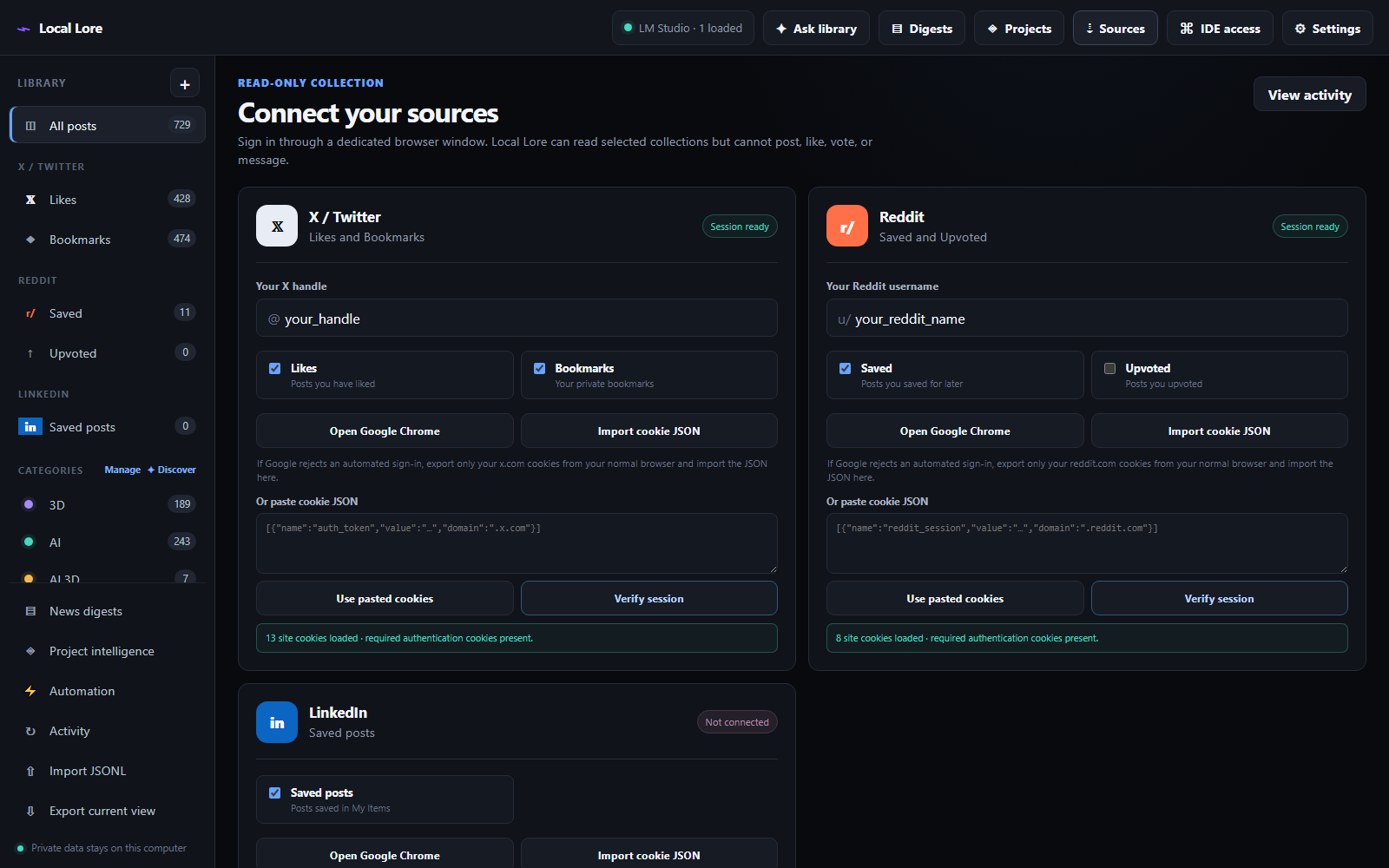
Digester uses your installed stable Chrome build with a dedicated local profile stored under data/browser-profiles/. It never receives or stores your password, and the crawler contains no code for posting, liking, voting, following or messaging.
Sessions
- Choose Open Google Chrome per platform and sign in normally — the session stays in a local profile folder.
- If a Google-based login blocks the browser, export the relevant
x.com,reddit.comorlinkedin.comcookies and choose Import cookie JSON. Cookie-Editor arrays, Playwright storage-state JSON and simple{ "cookie_name": "value" }objects are all accepted. - Imported cookies are kept locally in
data/session-cookies/so they survive restarts. Treat the export like a password. - Verify session confirms a platform is signed in before a crawl starts.
Crawling
- Re-running a crawl is safe: posts are deduplicated by their platform ID and can belong to several collections at once.
- Include X replies collects replies for liked posts, up to a configurable maximum per post. Replies stay attached to their parent post and become part of its searchable RAG context. This makes Likes crawls slower, because each conversation is opened separately.
- Run unattended workflow chains the whole pipeline: crawl the selected collections, categorize a stable snapshot of up to 3,000 uncategorized posts, then create Today and Last 3 Days digests for every category with matching posts. Empty windows are skipped; every child job stays visible in Activity.
The Research Workspace
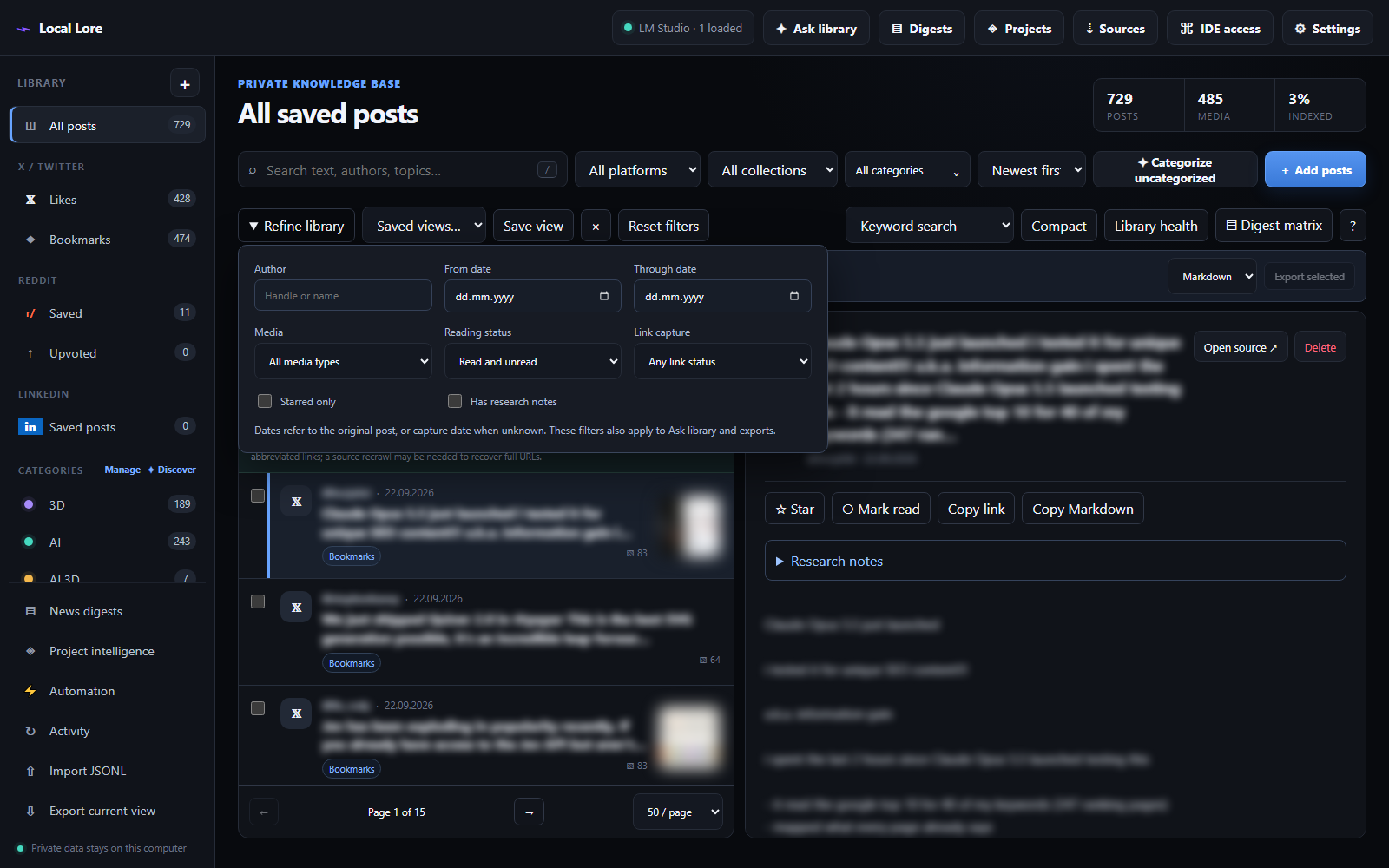
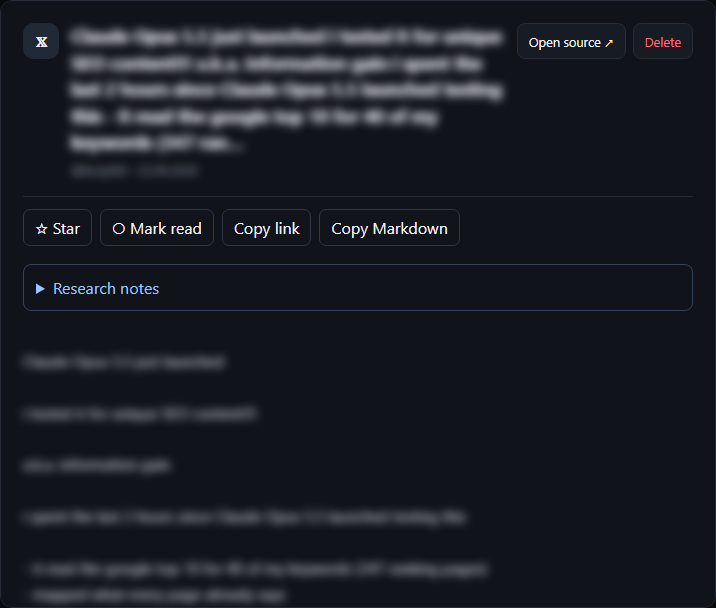
The library is not just a list. Refine library filters by author, inclusive post-date range, media type, reading status, stars, notes and captured-link status. Those restrictions carry through keyword and hybrid retrieval, Ask library, exports — and the read-only MCP tools expose them too.
- Keyword search paginates every matching post with accurate totals, at 25, 50 or 100 posts per page.
- Hybrid search returns a ranked shortlist from up to 50 retrieved passages, deduplicated into posts. It is a shortlist, not an exhaustive count — exporting that view exports what is displayed.
- Stars, read state and research notes live in SQLite, survive re-crawls, and become separately attributed RAG chunks. Your annotations never replace the original source text.
- Bulk actions work over up to 500 selected posts, including across pages: mark read/unread, star/unstar, add or remove categories without touching unrelated assignments. Edits are transactional — a validation failure changes none of the selected posts.
- Save view stores a named filter set in the database. Filter state, page size and compact density restore in the same browser.
- Library health reports categorization, reading, annotation and embedding coverage, link statuses, and media records without a download path.
- Unsaved note drafts are kept in the browser — Save notes persists and indexes them, Discard draft restores the saved version.
Keyboard Shortcuts
Shortcuts do not fire while you are typing or while another dialog is open.
Categories
A post can belong to several categories at once. Categories are persistent, stored in the local SQLite library with their descriptions, and survive app or folder reloads.
- Categorize uncategorized classifies up to 100 posts from the current platform/collection with LM Studio. Automatic categorization preserves manual tags.
- Open any post to adjust its categories, create a custom category, or ask LM Studio to classify just that one.
- The category menu accepts multiple selections: Any selected is an OR filter, All selected is an AND filter. The same selection scopes keyword and semantic search, Ask Library and exports.
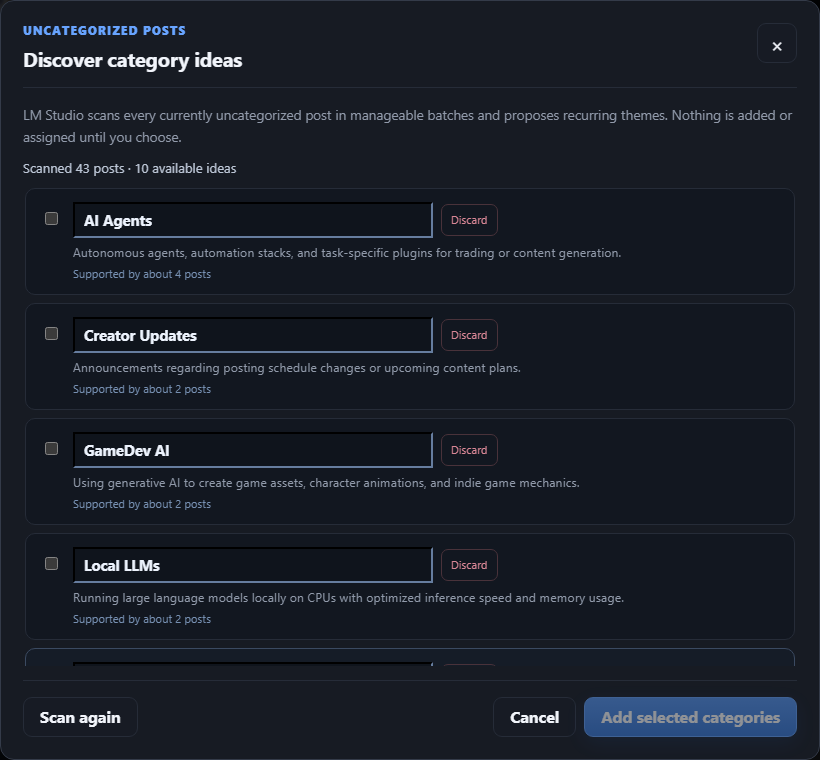
- Discover scans every uncategorized post for recurring themes and proposes names and descriptions for review. Names are limited to one or two words and stay editable before you add them. Discard permanently removes an unwanted idea from the current scan. Discovery proposes, it does not assign — categorize manually or in batch afterwards.
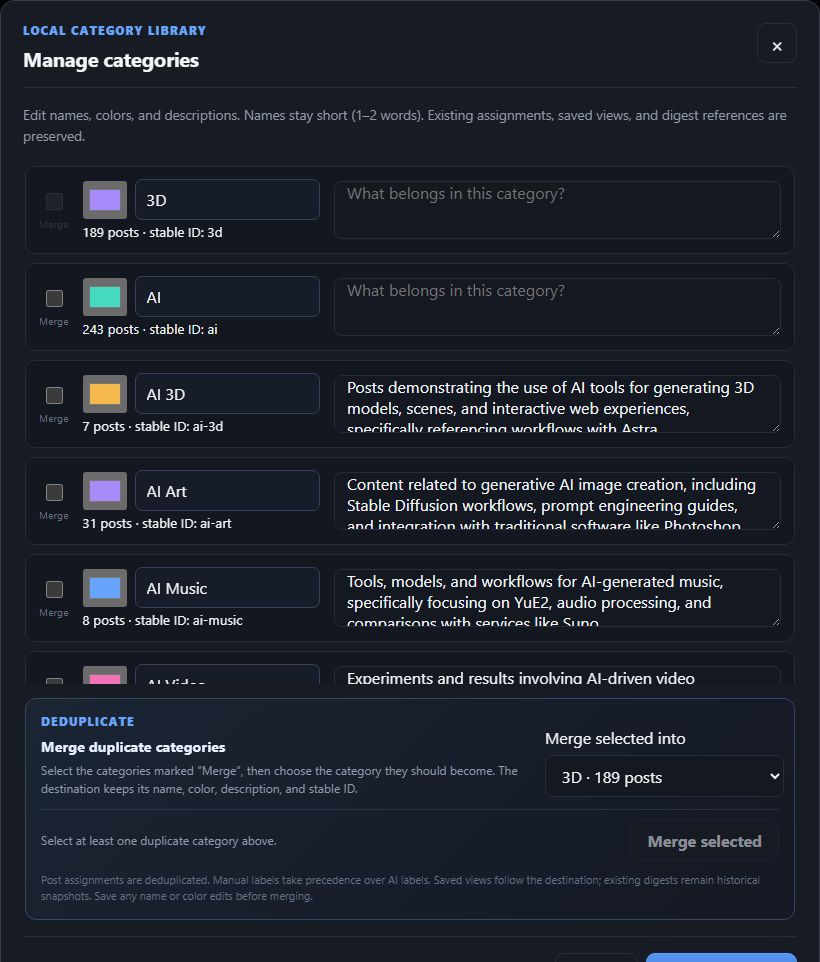
- Manage edits short names, colors and descriptions while preserving stable category IDs and slugs. It also merges duplicates into a chosen survivor: overlapping assignments collapse to one, manual labels win over AI labels, retrieval context is rebuilt for affected posts, and saved views are rewritten automatically.
- Existing digests keep their original category label as historical snapshots — a merge never rewrites a briefing you already read.
Category Digests
The Digests view is a category × time-window matrix. A colored cell is the newest saved result — click it to read the briefing, or check it to regenerate. Select missing cells, pick up to 20 combinations, and choose Generate selected.
How a digest is built
- LM Studio first condenses the matching posts in bounded batches, then writes one source-grounded briefing from those summaries.
- Each section links back to its supporting posts; relevant saved images and videos appear with the original source cards.
- The queue is created immediately and processed sequentially, keeping exactly one LM Studio request active at a time.
- Empty combinations are reported and skipped. A failure in one digest does not stop the rest of the queue.
- Completed digests are stored in SQLite and stay available across restarts.
- A chat model must be loaded in LM Studio. Semantic embeddings are not required for this feature.
Digests stay deliberately category-specific so each saved briefing has one stable category identity. The single-category generator remains available for quick one-off briefings, and the All posts toolbar has a Digest matrix shortcut.
Project Intelligence
This is the feature that makes a saved-post archive actionable: pick one of your local Codex projects and ask what the last week of saved posts actually means for that codebase.
Profiling a project
- Digester reads the project name and primary folder from Codex's local project registry — there are no manual metadata fields to fill in.
- LM Studio infers concise focus notes from the project's current evidence.
- A scan inventories readable code, documentation and recent Git work. It skips secrets, dependencies, caches, generated output, model weights and large or binary files.
- The resulting implementation profile cites the project-relative files that support each capability or limitation.
- Malformed local-model JSON is repaired when possible, retried once in a compact form, and then safely recovered from validated LM-generated component notes.
Impact digests
- Generate an impact digest for today, three days, a week, a month, six months or a year — optionally narrowed to one post category.
- The report only keeps developments supported by both saved posts and project evidence.
- It contains the current implementation, a capability comparison, pros, cons and unknowns, recommendations, source URLs and media, project file evidence, and prioritized next steps.
- Colored topic tags, expandable implementation cards and report sections, and an On this page index keep large profiles navigable. Open/closed sections stay stable while background progress arrives, and Expand all / Collapse all sit at the top.
Deep analysis
Click a topic tag, choose Deep analyze on an implementation or finding, or type a topic into Explore a topic. This rereads the project folder — not just the stored profile — searches within files for topic-specific source excerpts, and retrieves matching saved posts and comments through the existing RAG search. Compatible embeddings enable hybrid retrieval; keyword search works without an embedding model. This searches the whole saved library, independent of the impact digest's date and category filters.
A topic report includes implementation comparisons, pros and cons, concrete evaluation steps, original posts and media, and expandable source excerpts. Reports are saved in the project's digest history and are reachable through the read-only MCP tools.
Coverage and retrieval-fallback warnings appear in the saved report. Deep analysis does not run project code, execute benchmarks, or verify social-media claims.
Ask Your Library
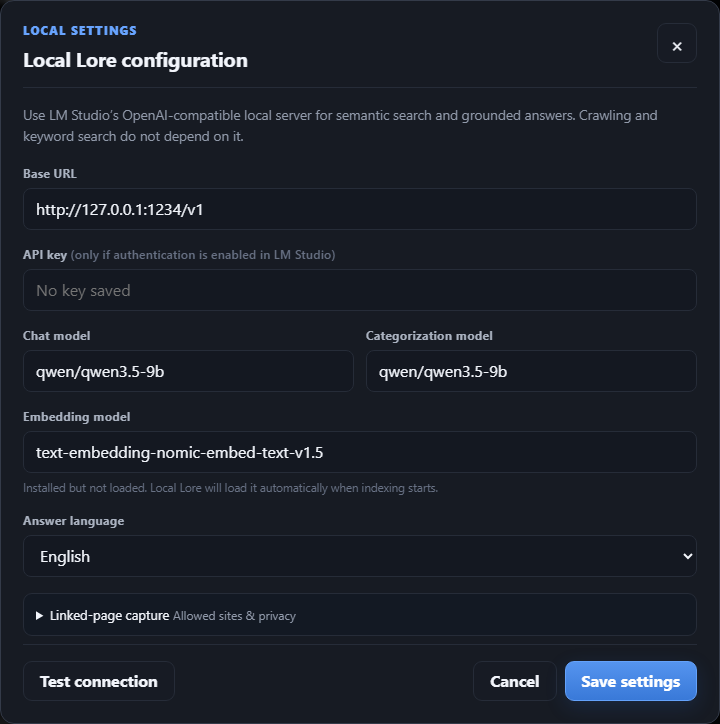
LM Studio's local OpenAI-compatible server provides embeddings and grounded question answering. Build semantic index in the Ask view creates the embeddings; keyword search works without that step and embeddings simply improve conceptual retrieval.
- Ask searches the entire archive by default. Enable Use current Library filters only when the answer should be constrained to the active source, category, date, media or workspace filters.
- Retrieval prioritizes exact keyword matches while the semantic index is still incomplete.
- Results return distinct posts rather than many chunks from the same page.
- The retrieval mode and semantic coverage are shown below every answer, so you always know how much of the library the answer could actually see.
- Embeddings are stored alongside chunks as JSON vectors — the archive stays self-contained and needs no separate vector service.
Technical Notes: How Digester Uses Models
Digester has three independent model slots in Settings, because the three jobs have very different demands. Pointing all of them at one flagship model works, but it wastes VRAM on tasks that do not need it.
Fallbacks
- If no category model is set, categorization falls back to the chat model.
- Translation uses the chat model, or the category model when no chat model is selected.
- Without a chat model, digests and project reports are reported as skipped rather than failing repeatedly.
- Without an embedding model, retrieval silently stays keyword-only and the Ask view reports the reduced semantic coverage.
Why temperature is low everywhere
Nearly every call asks for strict JSON against a fixed schema — category assignments, digest sections with citations, project findings with file evidence. Consistency matters far more than creativity, so temperatures sit between 0 and 0.2. A model that is unreliable at structured output will cause more visible failures here than a model that is merely a little less eloquent.
Vision models are supported — and used
During categorization, Digester attaches up to two images per post as base64 data URLs. A vision-language model uses them; a text-only model rejects them and Digester silently retries text-only, so nothing breaks either way.
It matters more than it sounds. A post reading "check out this render I made" with an attached image categorizes as Art from text alone, but as 3D Rendering, Digital Art, Design when the model can actually see the picture. Screenshots of code, technical diagrams, artwork and memes all classify noticeably better with a VL model in the category slot.
Recommended Local Models
The sweet spot is a mid-size chat model plus a small vision model for categories. The setups below are the ones actually benchmarked against this app; VRAM figures assume Q4 quantization.
🎯 Recommended — vision & speed
🏆 Highest quality
💰 Budget — smallest workable
Model comparison
Widely available alternatives
If you are starting from a clean LM Studio install rather than an existing model library, these are easy to obtain and behave well against this app's strict-JSON prompts:
- Chat slot:
Qwen2.5-14B-Instruct(Q4_K_M, ~7 GB) is the best single all-rounder — it can run every slot on its own if you only want one model.Llama 3.1-70Bbeats it if you have ~35 GB free;Mistral-Large-2andDeepSeek-V3are comparable at the top end. - Category slot:
Qwen2.5-7B-Instructis roughly 95% as good as a 35B at classification for a fraction of the VRAM.Llama 3.2-8BandPhi-3.5-miniare solid baselines. - Embedding slot: use a dedicated embedding model, never a chat model —
nomic-embed-text-v1.5(~4 GB) is the recommendation,BAAI/bge-small-en-v1.5(~2 GB) if VRAM is tight. Both index the library roughly an order of magnitude faster than a general chat model.
Rough performance expectations
Two practical notes. Digests hold one LM Studio request active at a time by design, so a smaller, faster chat model shortens the whole queue roughly linearly — this is where model choice is felt most. And because the GPU idle analyser only starts automatic digests on genuinely idle cards, a setup that leaves headroom (say 9 GB rather than 20 GB) gets far more automatic runs in a normal working day.
Automatic English Translation
Japanese, Korean and Chinese (simplified and traditional) post titles, post text and captured replies are queued for English translation automatically. Existing library content is backfilled on startup; new crawls and imports join the same persistent queue. No recrawl is needed.
- English is shown by default with an expandable Show original section. Original records are never overwritten.
- URLs, Markdown destinations, mentions and code are protected before translation and checked afterwards. A changed or missing protected token makes the result fail validation rather than replace a link.
- Image and video pixels, and text inside code, are not translated.
- The library's Auto-English indicator shows queue progress and offers Retry now for delayed translations.
- Missing model configuration leaves work pending; offline or model errors retry with backoff. Translation only starts new requests while other background work is idle.
- Successful translations are cached across restarts and recrawls. Changing a post or reply invalidates only its own translation, and stale in-flight results are discarded.
- Stored translations are included in full-text and RAG search, future categorization and digest inputs, JSONL/Markdown exports, and MCP post results. Previously written digests are not rewritten.
LM Studio uses your configured chat model, or the categorization model if no chat model is selected. Rebuild the semantic index after a backfill to embed the updated English-containing chunks — keyword retrieval works immediately.
Automatic Linked-Page Capture
A post that is just a link is worthless in an archive. Digester follows outbound links from newly crawled and imported posts and stores the readable page text alongside the post, so the actual content becomes searchable.
By default it reads public pages on GitHub (including raw README text), Hugging Face, Civitai, X/Twitter, Twitch and arXiv. Open Settings → Linked-page capture to pause new requests or edit the exact hostname allowlist.
- Each post gets an expandable Linked content section with the original URL, resolved destination, capture time, readable text and a captured / partial / blocked / failed status.
- Failed requests retry after five minutes, up to three attempts. Retry failed links handles them on demand.
- Pages are cached in SQLite across restarts and recrawls, and shared when several posts cite the same URL.
- Scan existing posts for links runs a safe catch-up over every collection: it queues only missing links, reuses captured or partial pages, and leaves active requests, failed retries, originals, categories and translations intact. It never bypasses the allowlist or retries blocked redirects.
- Linked text is added to keyword search immediately, and to categorization, category discovery, digests and project comparisons. Run Index library after capture to embed the new RAG chunks.
- Previously saved truncated display URLs cannot be reconstructed — recrawl those posts to capture their real hyperlink destinations.
Provenance tagging — how captured text is handed to the model
Markdown exports and RAG context use escaped, provenance-tagged source text, so the model always knows the passage came from an untrusted external page:
<linked_content original_url="https://t.co/example"
                source_url="https://github.com/org/repo"
                fetched_at="..." status="complete" trust="untrusted_source">
Page title and readable source text
</linked_content>
Safety & coverage limits — hosts, redirects, depth, rate, size
Allowlisting is a network policy, not a guarantee of safe or accurate content. Fetched text is displayed escaped and treated as untrusted reference data by the LLM. Dates describe the capture, not the date of every claim. Removing an allowed host removes its cached text from retrieval. Imports preserve link associations and refetch pages rather than trusting imported capture text.
Automation: Scheduled Crawling
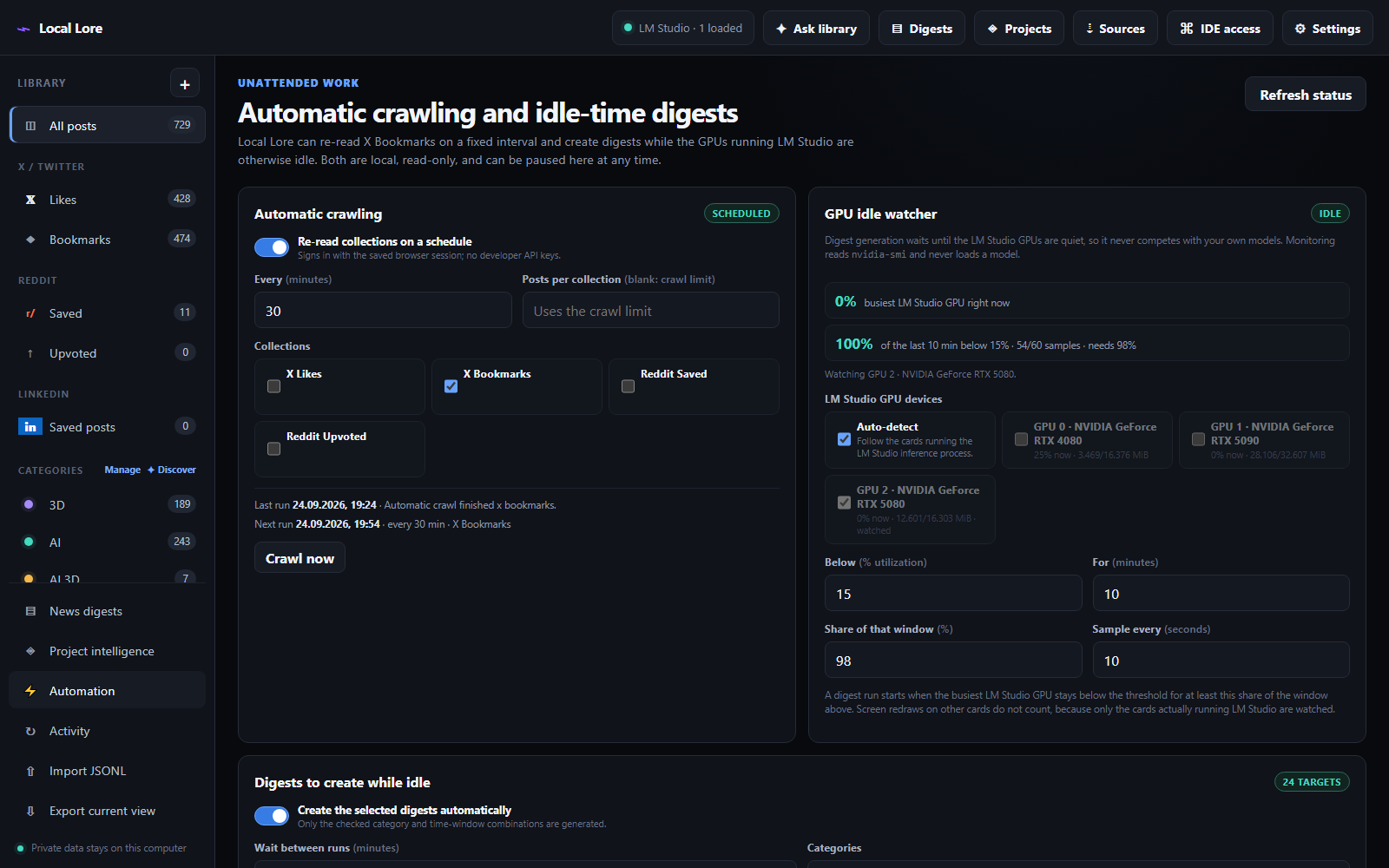
The selected collections are re-read on a fixed interval — the default is X Bookmarks every 30 minutes — using the same saved browser session as a manual crawl. No developer API keys are involved, and nothing is posted, liked or followed.
- A cycle is skipped, with the reason recorded on the Automation page, when the platform is not signed in or another crawl, indexing, categorization or digest job is already running. A skipped cycle never leaves a failed entry in Activity.
- Runs appear in Activity as a parent
automaticrow plus one row per collection, so a scheduled crawl is never mistaken for a manual one. - The interval, the collections and an optional per-run post limit are configurable. A blank limit uses the crawl limit from Settings.
- The next run time is shown on the page and the schedule survives restarts: a restart does not repeat a crawl that already ran inside the interval.
Automation: The GPU Idle Analyser
Digest generation competes with your own models for the same card, so Digester waits for a genuinely idle GPU instead of a fixed time of day. It reads nvidia-smi directly — it never loads a model or runs a benchmark to probe the cards.
Why it watches the right cards
- LM Studio runs inference in a separate
llama-serverbackend process, and one model can be split across several cards. The analyser follows those inference processes to the cards they hold and watches that whole set. - The
LM Studio.exedesktop process is deliberately ignored: it is Electron and holds a graphics context on whichever card the window is drawn on — usually not an inference card at all. On the machine this was verified on, that distinction is the difference between watching the RTX 5090 and watching the RTX 4080 + RTX 5080 that actually run LM Studio. - Nothing is guessed. If the LM Studio cards cannot be identified, the page says so and no digest is generated.
- A failed
nvidia-smireading is never counted as idle time, so a driver problem pauses digest generation instead of triggering a burst of it. - While the window is still filling, the page reports how many samples have been collected out of the expected number, and no digest starts.
Selecting what an idle run may produce
Digests to create while idle takes either every category — including categories you add later — or a named subset, plus the time windows. Each selected category/window pair becomes one digest, created sequentially in the order shown, with at most one LM Studio request active at a time. Empty windows are skipped silently rather than reported as failures.
Both behaviours are independent and either can be paused without affecting the other. Both can also be triggered on demand with Crawl now and Generate now, which ignore the schedule and the GPU rule so a configuration can be verified immediately. Without a chat model configured, an automatic run is reported as skipped instead of failing repeatedly.
AI / IDE Access Through MCP
A bundled read-only MCP server makes the library available to Codex, Cursor, Claude Desktop and DeepSeek Harness. The dashboard does not have to be running: the MCP process opens the same SQLite database directly.
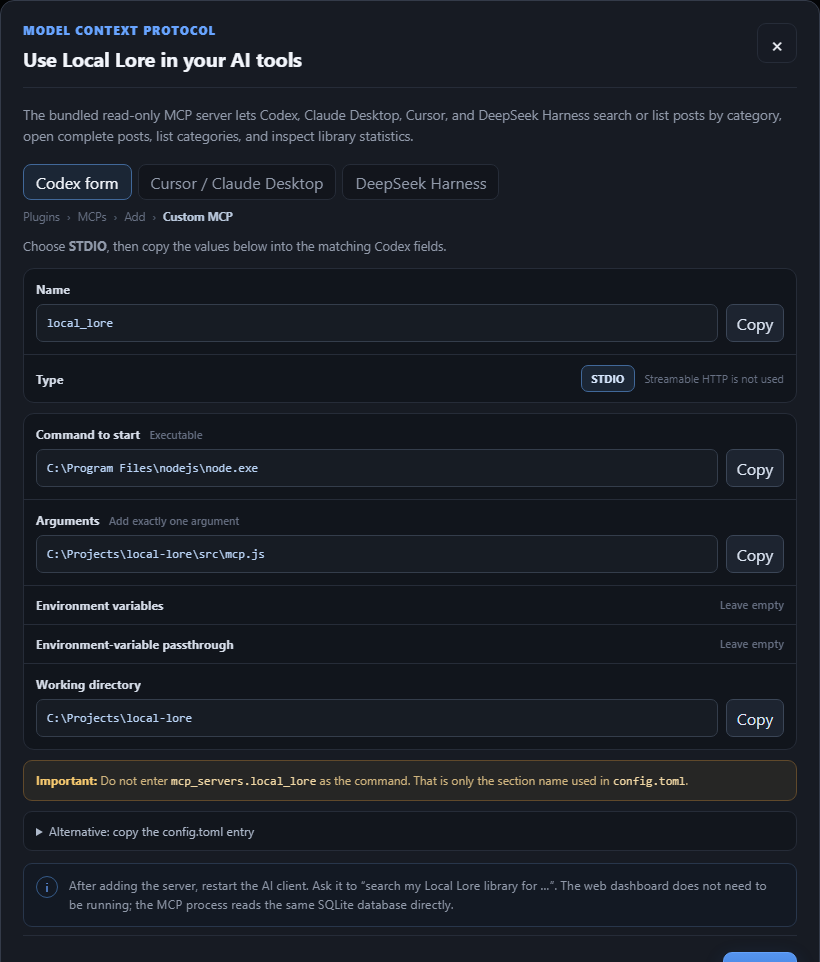
Open IDE access in the dashboard to copy configuration containing the exact Node and project paths for your machine.
The eleven read-only tools
Codex — custom-MCP form and config.toml
Fill the custom-MCP form exactly like this:
One trap: mcp_servers.local_lore is the TOML section name, not the executable command for that form.
[mcp_servers.local_lore]
command = "C:\\Program Files\\nodejs\\node.exe"
args = ["<project>\\src\\mcp.js"]
cwd = "<project>"
Cursor & Claude Desktop — mcpServers JSON
{
  "mcpServers": {
    "local-lore": {
      "command": "C:\\Program Files\\nodejs\\node.exe",
      "args": ["<project>\\src\\mcp.js"],
      "cwd": "<project>"
    }
  }
}
Restart the AI client after adding the server.
DeepSeek Harness — Cordis patch layer (and its two traps)
DeepSeek Harness does not read an mcpServers JSON or a config.toml. It loads MCP servers from a Cordis patch layer, so the entry is YAML. The DeepSeek Harness tab under IDE access shows the exact path and snippet for your machine, and Install into DeepSeek Harness creates the patch file when it does not exist.
- insert:
    - id: mcp-local-lore
      name: '@deepseek-ai/dsh-mcp-client'
      config:
        serverName: local_lore
        transport: stdio
        command: 'C:\Program Files\nodejs\node.exe'
        args: ['<project>\src\mcp.js']
        env: {}
        cwd: '<project>'
The entry goes into %DSH_HOME%\cordis.patch.yml for every profile, or %DSH_HOME%\profiles\<profile>\cordis.patch.yml for one. %DSH_HOME% defaults to %USERPROFILE%\.dsh.
Two details are easy to get wrong:
- Keep the
insert:wrapper. A bareid/name/configrow is treated as an override for an existing row rather than an insertion, and is dropped silently. - Quote the Windows paths with single quotes so YAML does not read
\PinC:\Program Filesas an escape sequence.
If the patch file already contains other entries, Digester leaves it untouched and shows the snippet to paste by hand, because that file is shared configuration. DeepSeek Harness reloads patch layers live, so only a new session is needed — not a restart — and the tools appear as mcp__local_lore__<tool>. Note that DeepSeek Harness does not apply its file or command sandbox to MCP child processes: the server runs with the same privileges as the harness host. Digester's MCP server is read-only and requires no elevated access.
Storage & Exports
All mutable data is ignored by Git and stored below data/:
data/
  ├── local-lore.db
  ├── browser-profiles/
  │   ├── x/
  │   └── reddit/
  ├── session-cookies/
  │   ├── x.json
  │   └── reddit.json
  └── media/
      ├── x/
      └── reddit/
The database uses normalized items, item_collections, categories, item_categories, category_suggestion_jobs, digests, projects, project_digests, comments, media, chunks, item_workspace and saved_views tables. Embeddings live alongside chunks as JSON vectors, so the archive stays self-contained.
- Export current view writes one JSON object per line with stable fields for RAG pipelines.
/api/export?format=markdownprovides a human-readable alternative.- The JSONL importer understands both Digester exports and compatible normalized records. Re-import restores notes, stars and read state.
- Selected posts can be exported as Markdown or JSONL from the bulk-action toolbar.
- JSONL is a record export, not a complete backup. It contains media references, not media files, settings, saved views or account cookies — keep a separate backup of the data directory if you need one.
Activity & Job Handling
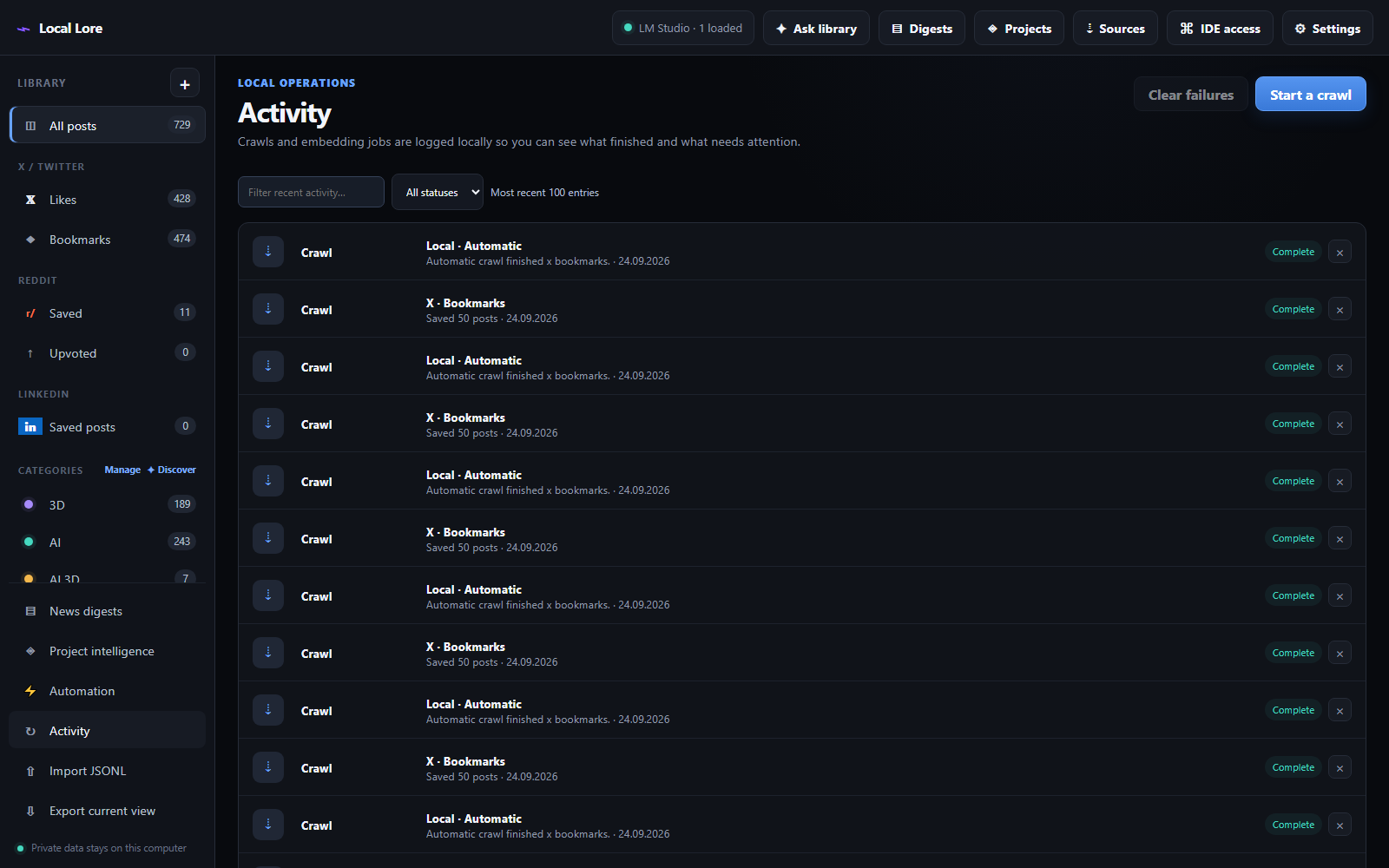
- The Activity view keeps a local history of every operation, with status and text filters over the latest 30 entries.
- Clear failures removes all failed entries at once; × removes an individual completed or failed row.
- Active and queued operations cannot be removed. Queued collections start sequentially.
- If the service restarts during a job, that abandoned job is marked failed on the next startup instead of sitting under In progress forever.
Getting Started
Node.js 20 or newer is required. For a fresh checkout:
npm install
  npx playwright install chromium
  npm start
On a machine that already has its dependencies installed, double-click start-local-lore.bat or run npm start. The launcher starts the local service in the background, waits until port 4317 is ready, and only then opens http://127.0.0.1:4317 — so you never land on a temporary ERR_CONNECTION_REFUSED page. If it finds an instance inherited from a network-restricted terminal or an older build, it replaces that process automatically.
First-time setup
- Open Sources, enter your X handle and Reddit username, and select the collections you want.
- Choose Open Google Chrome per platform and sign in, or import cookie JSON. Then Verify session.
- Choose Start crawl, or Run unattended workflow to crawl, categorize and generate the first digests in one go.
- Open Settings and point Digester at LM Studio — the default URL is
http://127.0.0.1:1234/v1. Load a chat model and, optionally, an embedding model. - Choose Build semantic index in the Ask view. Keyword search already works without it.
- In Library, select Categorize uncategorized, then use Discover to find the themes you did not think of.
- Open Digests and generate your first briefings from the matrix.
- Open Projects, pick a local project, and generate an impact digest.
Safety & Practical Limits
- The crawler contains no code for posting, liking, voting, following or messaging. It reads, nothing else.
- The server binds to
127.0.0.1only. LM Studio URLs are restricted to localhost or private-network addresses. - Media downloads are restricted to known X, Reddit and LinkedIn media hosts and capped at 25 MB per file.
- Social websites change their HTML periodically. If a crawl suddenly returns zero posts, the selectors may need a small update.
- Some streaming video URLs are browser-only blobs or segmented streams. Digester keeps the post URL and downloads media only when a durable source URL is available.
- Use conservative crawl limits and follow the platforms' terms and rate limits.
- Your login session lives in a local browser profile. Treat exported cookies like a password: never share or commit them.
Under the Hood
A small Express service with a dependency-free browser UI — no build step, no frontend framework, no bundler.
Built on Express 5, better-sqlite3, Playwright, cheerio, ipaddr.js, zod and the official MCP SDK. Checks and tests run with npm run check and npm test.
Source Code
Digester lives in a self-hosted GitLab repository. It is private and invite-only — the link will not open without an account that has been granted access.
https://gitlab.aikanova.com/nerdpraxis/Twitter_Reddit_verarbeiter
Open the Repository →